Pixel Gun 3D - Best Shooting Game
• 94.4K Plays • 754.4K Views • star 4.3 (5.4K)
All
Device
5.4K ratings
Rate This Game
gamepad How to Play Pixel Gun 3D
Controls
- WASD or arrow keys to move
- Left mouse button to shoot
- R to reload
- Space bar to jump
- Number keys to switch weapons
info About Pixel Gun 3D
One session is rarely enough once you get used to the rhythm of Pixel Gun 3D and its Games For Free flow Through repetition, Try Shooting Games gameplay here reveals deeper strategic layers Gameplay progression feels satisfying when moving from Beaver Builder to Grandfather Road Chase: Shooter.
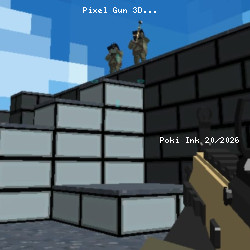
Pixel Gun 3D game with blocky multiplayer action. Have fun in this blocky-style multiplayer 3D first-person shooter game. Jump into the blocky world of one of the best free online games around. In this awesome multiplayer game, choose a blocky character and try to rack up as many kills as possible.
There is a cool battle royale game mode, in which players strive to be the last pixelated character standing. Like many shooting games, Pixel Gun uses basic FPS controls - WASD movement keys, mouse to aim, and left-click mouse button to shoot the primary weapon.
To start a new game, first choose a server - Europe, America, or Asia. Secondly, look at the list of available games open and choose a suitable title with open spaces. Players will then enter the game and start fighting.
There is a myriad of awesome maps to play on. Each map has a different layout and fantastic pathways to explore and fight along. Get used to the different maps and have fun trying the different game modes. This is a favorite game of many hardcore games - it is simple, but the gameplay is excellent and challenging.
Choose from devastating weapons like sniper rifles
The game has a great choice of pixelated weapons. Remember that ammunition is limited, so use it wisely! The following are some of the weapons available:
- Shotgun
- Sniper Rifle with scope
- Revolver
- Light Machinegun
Pick your favorite weapon and use it to unleash devastation on the other pixelated characters!
Fight across different blocky maps
Pixel Gun 3D has unique maps of various shapes and sizes. The maps make fighting interesting and provide an element of strategy too.
Give this game a try today and see if you can survive the battle royale or the awesome multiplayer game action. Don’t forget to try out the different shooting games available at Poki Ink, too, for more FPS fun. Examples of available maps include:
- Bridge
- Castle
- Crash
Bridge, for example, is full of fun and has a huge bridge in the middle of the map - players can use this as a vantage point to shoot down on enemies running along the ground. When selecting a server to join, you can see which map is currently in rotation.
Players also have the option to create their own servers with password protection - this means you can practice with your friends before joining a multiplayer game and unleashing your new skills on the enemies! Give this awesome pixelated shooter a try today!
Platform
Web browser