Supermarket Simulator: Desert Online
Fluffy Games • 198.1K Plays • 2M Views • star 4.4 (7.3K)
summarize Quick Overview
All
Device
7.3K ratings
Rate This Game
gamepad How to Play Supermarket Simulator: Desert
Controls
- WASD or arrow keys = movement
- Left and right mouse buttons = interact with items and customers
- Right mouse button = take item
- G = throw an item
- E = exit the cash register
- Tab = unlock/lock cursor
info About Supermarket Simulator: Desert
Just a few seconds on Poki Ink brings you straight into the action of Supermarket Simulator: Desert Built for short bursts, this Top Free Casual setup fits perfectly into Online Games sessions A blend of challenge and fun appears across Defuse the Bomb 3D and Bridge Builder.
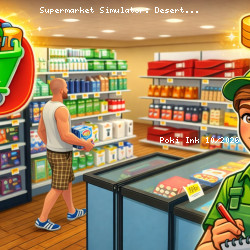
Supermarket Simulator: Desert is a retail management game that puts you in charge of a growing shop. You scan goods, handle payments, restock essentials, and keep every customer satisfied as the pressure rises. With each challenge, you refine your strategy, expand your space, and prove you can build a thriving desert marketplace from the ground up.
Features
- 🔺 Manage your own supermarket in a unique desert environment.
- 🔺 Serve your customers and help them find the right products.
- 🔺 Replenish shelves and keep an eye on product assortment.
- 🔹 Expand and improve the store to attract more customers.
- 🔹 Manage inventory and organize the store efficiently.
- 🔹 Intuitive controls and addictive gameplay.
- 🔹 Bright and detailed graphics, conveying the atmosphere of the desert.
- 🔹 Compete with other players for the status of the best supermarket.