Towering Trials Online Game
Tynamite Games • 155.5K Plays • 155.5K Views • star 4.3 (6.7K)
All
Device
6.7K ratings
Rate This Game
gamepad How to Play Towering Trials
Controls
Game Controls
- W / up arrow key = jump or fly
- A / left arrow key = move left
- D / right arrow key = move right
- P / Tab = pause
Editor Controls
Click on the type of tile you want to lay on the screen to start editing. You can choose what kind of tile you want to lay using the group buttons (block, spike, etc.) to the left of the block buttons.
If a laid tile has a green outline, it has been selected.
Mouse
- If hand button on & building = lay multiple tiles with a mouse drag
- If hand button on & editing = select multiple tiles with a mouse drag
- If hand button off & building = scroll upward with a vertical mouse drag / lay a single tile
- If hand button off & editing = scroll upward with a vertical mouse drag / select a single tile with a mouse click
- Mouse-scroll = Move the camera view up and down
Keyboard
- WASD = move selected tiles
- Shift + WASD = move selected tiles 1/16 of a grid block
- Alt + WASD = Move selected tiles 1/2 of a grid block
- QE = rotate selected blocks
- Ctrl + S = save the editor level
info About Towering Trials
You may enter casually, but Towering Trials builds intensity through its Free Game Online gameplay loop The gameplay in Towering Trials feels responsive, enhancing overall player control
Ready for something fun Launch Towering Trials instantly and dive in After spending some time with Towering Trials, it might be interesting to switch over to Pixel on Titan: AoT or explore Paint Room Escape.
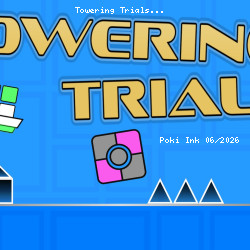
Towering Trials is an engaging vertical-scrolling platformer that challenges players to jump, dash, and fly to the finish line across various levels. This game blends creativity with skill, making it a perfect pick for platformer enthusiasts who enjoy challenging gameplay and the freedom to create and share custom content.
Features
- Flexible Level Selection: Players can choose from several prebuilt levels in any order. The level selection screen provides a visual difficulty guide using animated faces: the more anxious the face, the more complex the level.
- Creative Level Editor: Design and build custom levels to share with friends, allowing endless replayability and personalized challenges.
- Dynamic Movement Mechanics: Master jumping, dashing, and flying mechanics to navigate challenging vertical layouts.
- Skill-Based Gameplay: The game's difficulty increases with more intricate platforming challenges and obstacles, making it a true test of precision and timing.
help Frequently Asked Questions
What are the main objectives in Towering Trials? expand_more
How do I control my character in Towering Trials? expand_more
Is Towering Trials a challenging game? expand_more
Are there ways to customize content in Towering Trials? expand_more
Do you have any tips for succeeding in Towering Trials? expand_more
Related Games
City Takeover

Ships 3D
Stickman Clicker

Supermarket Simulator: Desert
Wolf Simulator: Wild Animals 3D

Perfect Piano

Finger Fury Flashmaster

Short Life

Tank Wars
Zoo - Happy Animals
Coffee Match: Block Puzzle

GoKarts.io
Infection Town of Zombies
Blocky Parkour: Only Up Adventure
Cubes 2048.io