Bakery Manager: Store Simulator
Finz Games • 148.4K Plays • 741.7K Views • star 4.3 (9.1K)
All
Device
9.1K ratings
Rate This Game
gamepad How to Play Bakery Manager: Store Simulator
Controls
- WASD = move
- Mouse click for choose products
info About Bakery Manager: Store Simulator
A few moments on Poki Ink bring you directly into the world of Bakery Manager: Store Simulator With each session, players refine their approach to this evolving Game Casual Free system
Bakery Manager: Store Simulator stands out in the Free Games category through its smooth execution Bakery Manager: Store Simulator runs on unity, providing stable performance and responsive gameplay interactions.
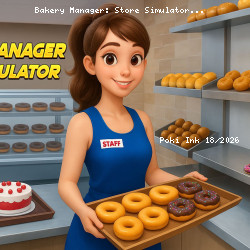
Bakery Manager: Store Simulator is a casual simulation game where you manage a bakery on one of the hottest strips in town. You get to serve customers, scan items, handle cash, and manage stock to keep the line moving and shoppers smiling. As your bakery gains popularity, you can unlock new bakery goods, upgrade the store, and expand the business into the town’s go-to destination for sweet treats and more.
How to Play Bakery Manager: Store Simulator
You’re the newest baker in the town of Doughville, and your goal is to become a bakery icon in Bakery Store Manager: Store Simulator, where you get to turn a shop with empty shelves into a bustling morning hot stop.
Your first step is to pick up the package waiting outside the bakery, then stack your shelves with donuts. Once your shelves are at least partly full, you can open your shop by flipping the “Closed” sign outside. Hungry guests will begin to arrive, so be ready to serve them.
Stock Your Shelves
Keep your shelves stocked to keep customers happy, and don’t let them wait too long before checking out and buying their pastries. When you need more inventory, head to your computer to place an order for waffles, strawberry pastries, donuts, and white bread. Be careful not to order more than you can store. If you overstock, you’ll have to invest in more shelving or refrigerators.
Every item ordered has its place. For example, pastries and donuts belong in the refrigerator, while cereals and bread go on the shelves. It’s essential to order the right products for the amount of space you have.
As you level up, you’ll unlock licenses that allow you to sell more than just donuts. Follow the objectives to earn bonus XP and level up faster. Soon, your bakery can expand to include sodas, everyday groceries, canned goods, extra cereals, and much more. Each license unlocks at the level that matches its number, so License 2 becomes available when you reach Level 2. The levels continue with greater upgrades, taking your bakery from start-up to dessert empire. Keep baking, purchasing, and checking out customers, and you will be on your way to bakery icon!
Tip
When you place your first order, you’ll be able to set your prices. Choose wisely to make a profit without scaring off customers.
More Games Like This
Enjoy casual games? We've got you covered. Explore our casual collection for favorites like Eggy Car, Little Alchemy (and its sequel, Little Alchemy 2), Friday Night Funkin, Sprunki, and plenty more.
Press play now and explore the exciting world of Bakery Manager: Store Simulator The variety within Doodle Road and Towering Trials adds more excitement to each session.